


MoneyGram® Money Transfers App
4.651.86K Reviews
App Specs
- Version
- 27.11.0
- Updated On
- License
- Free
- Downloads
- 5,000,000+
- Developer
- MGI
- Categories
- Finance
- Platform
- Android, iOS
Screenshots
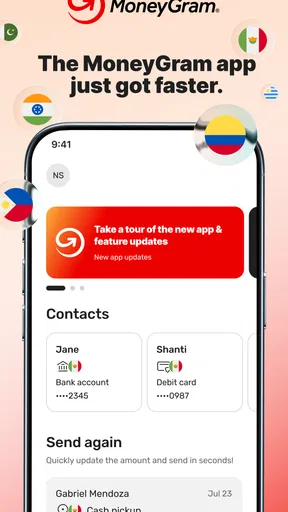

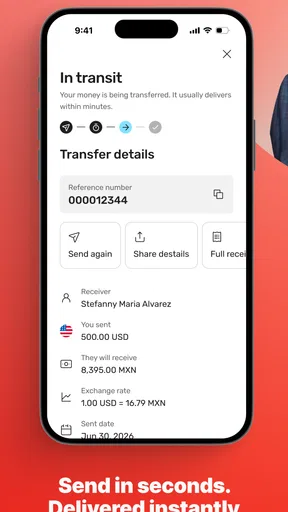
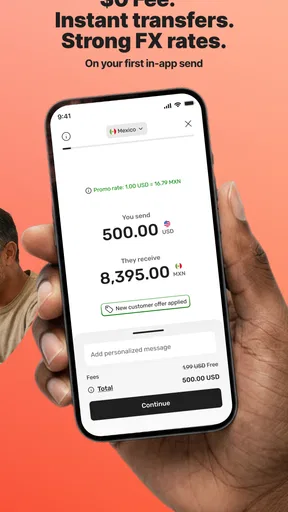

 Analysis by AppCompare
I judge a money-transfer app less by how many options it puts on screen than by whether I can understand the important choices before committing. With an international payment, the recipient, delivery method, fees, exchange rate and timing all matter. MoneyGram is built around sending money across borders, so its value depends on whether that process fits the people and circumstances involved—not just whether the first screen looks simple.
Readability and navigation in a high-stakes task
The MoneyGram® Money Transfers App is a finance app from MGI, and its central task is easy to identify: arrange an international transfer. I find that focus helpful. A payment flow should make it clear what I am doing at each step, because a mistaken recipient or delivery choice is more consequential than tapping the wrong setting in a casual app.
MoneyGram’s guided transfer flow can be useful if you do not send money abroad often and would rather follow prompts than work through a dense menu. Before you commit, take your time with the recipient details and the payment summary. A practical habit is to check the recipient’s name against the details they gave you, then review the amount they are expected to receive and the total you will pay. Familiarity with an app should never replace that final check.
There is also a useful distinction between seeing an exchange-rate estimate and understanding the full cost of a transfer. I would review the rate, fees and delivery method together rather than treating any one figure as the whole story. If you are comparing services, compare the amount the recipient gets for the amount you spend, using the same destination and payment setup. That makes the comparison more meaningful than looking at a headline rate alone.
Motor and sensory considerations
A guided sequence can reduce the need to remember a long set of steps, which is useful for people who prefer to complete one decision at a time. It can also help someone who is new to international transfers see where they are in the process. In my view, a clean layout is most valuable here when it leaves enough breathing room to inspect names, amounts and payment choices without rushing.
Money transfers do ask for careful interaction: entering personal and recipient information, selecting options and checking the final details. Anyone who finds small-screen typing difficult may want to prepare the recipient’s information before opening the app, use a device they are comfortable reading, and avoid completing a transfer while distracted. If another person helps, I would keep the account holder in control of the final review and authorization rather than passing a phone around casually.
Notifications can make it easier to notice a status change without repeatedly reopening the transfer screen. Still, a notification is best treated as a prompt to check the transfer, not as a replacement for reading the status inside the app. People who rely on sound, visual alerts or vibration differently should choose the notification approach that works for them on their device and verify important changes directly.
Worth Reading Before You Choose

EA SPORTS FC Mobile 26 Is a Bigger Football Game, but It Takes Time

Flipboard Shows What News Apps Must Do Beyond the Feed

Switching to Android Auto Means Rethinking Your Driving Routine

Google Calendar Makes a Crowded Week Easier to Manage

Ludo King Makes the Most of the Minutes Between Plans

Baby Panda World Brings Quick Play to Modern Phones, but Its Game Library Feels Busy
Access when plans and locations differ
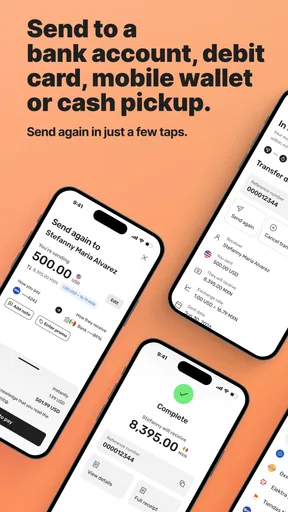
The app is most useful when the sender wants to arrange an overseas payment from a phone instead of making the whole process depend on a visit to a physical location. That can suit someone supporting relatives in another country, helping with an urgent household expense, or sending money while away from home. It also gives a sender a way to review the transaction details before paying, rather than making a decision without seeing the transfer summary.
One realistic example: a family member abroad messages you about an unexpected bill. I would first confirm the recipient’s details through a trusted channel, then open the app and compare the available transfer choices for the destination. Before sending, I would read the total cost and expected amount carefully and make sure the selected delivery method suits the recipient. That small pause is especially worthwhile when the request feels urgent, because urgency can make even a familiar payment flow easier to misread.
MoneyGram is free to download, but that does not mean every transfer has no cost. Transfer fees and exchange rates are part of the decision, so I would check the transaction’s terms in the app before confirming it. The service is rated for Everyone, and its current version is 26.5.12; those details do not change the need to handle financial and personal information thoughtfully.
Where the experience may not fit
The main trade-off is that a mobile transfer is not automatically the best choice for every recipient or every payment. If the person receiving the money cannot use the delivery method available to them, a different route may be more practical. Likewise, if your bank already offers a suitable international transfer with a better overall cost or a process you and the recipient understand, comparing that option is sensible rather than choosing by habit.
Someone who needs help assessing the transaction may also prefer to speak with a person before sending. An app can organize a transfer, but it cannot decide whether the recipient details are correct or whether the payment request is trustworthy. I would be particularly cautious with last-minute requests, unfamiliar recipients and messages that pressure me to act quickly. Verify the request independently, and do not treat a smooth interface as proof that a payment is safe.
Access can also depend on the context of use. A person with an unreliable connection, limited comfort with smartphone forms, or difficulty reading and entering details on a small screen may find an in-person or assisted option easier. If you are sending on someone else’s behalf, make sure the arrangement is clear and that the account holder understands and approves the transfer. Convenience should not come at the cost of someone’s control over their money.
Who I would recommend it to
I would consider MoneyGram for people who regularly support someone in another country and want a phone-based way to arrange transfers, as well as occasional senders who appreciate a guided process. It may be especially handy when the sender and recipient need to coordinate across different locations and the sender wants to inspect the transaction details before confirming. The app has an average rating of 4.6 from around 126,000 ratings, and it has been installed over 5 million times, which suggests it is a well-used option—but neither popularity nor ratings can tell you whether a particular transfer is right for you.
I would be less quick to recommend it to someone who only needs to move money between their own local accounts, since a domestic bank transfer may be simpler. It may also be the wrong fit if the recipient cannot access the chosen method, if another service gives a better total cost for the same transaction, or if you would rather have in-person help. The useful question is not “Which app is best in general?” but “Which route gets this recipient the right amount in a way both of us can manage?”
What using the app asks of you
I find it helps to treat each transfer as a short series of decisions rather than a task to rush through: gather the recipient’s details, consider the delivery choice, then review the full payment summary before confirming. That approach can make the process easier to follow, especially when you are using a small screen or handling an urgent request. It also sets up the next question: how well does the app’s flow fit the way you prefer to read, navigate and act?
Getting Started
First things first, downloading the app is a breeze. Available on both Android and iOS, you can snag it from the Google Play Store or the App Store. Once downloaded, setting it up is straightforward. You’ll be prompted to create an account or log in if you’re already a MoneyGram user. I appreciated the simplicity of the interface—it’s clean, intuitive, and doesn’t make my head spin.
The app requires some standard personal details to get you started. Don’t worry, it’s all secure. MoneyGram takes security seriously, and they’ve got encryption and protection protocols in place to keep your info safe. A big thumbs up from me on that front!
Features That Stand Out
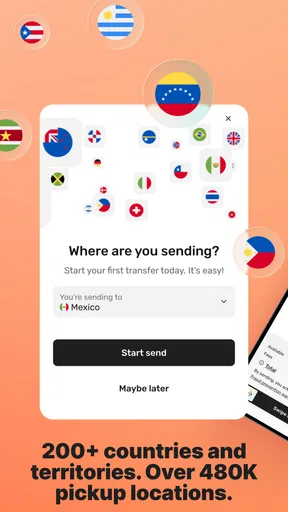
Now, let’s get into the juicy bits—the features. The MoneyGram® Money Transfers App is loaded with options that make sending money a walk in the park. You can send money to over 200 countries and territories. Yes, you read that right! With just a few taps, your cash is on its way to your recipient.
Real-time tracking is a feature I found particularly useful. You can see exactly where your money is in the transfer process. No more checking your watch and biting your nails while wondering if your funds have reached their destination.
- Exchange Rate Calculator: Another gem is the exchange rate calculator. It gives you a quick look at the current rates, so you know exactly how much your recipient will get. No surprises, just straightforward information.
- Fee Transparency: Speaking of straightforward, the app is transparent about the fees involved. Everything is laid out clearly before you hit the send button. It’s like having a mini-accountant in your pocket.
- Multiple Payment Options: Whether you want to pay using a bank account, credit card, or even cash (in select locations), MoneyGram has got you covered.
Those choices are worth treating as a decision, not just a convenience menu. The best payment method can depend on your own circumstances and the destination, so I would compare the displayed total and recipient amount before picking one. If you send to the same person more than once, keeping a note of the method and details that worked well can make the next transfer easier to review—but I would still verify everything each time.
User Experience
Let’s talk about the user experience. Navigating through the app is as smooth as butter. The design is user-friendly, and I didn’t find myself scratching my head trying to figure out what to do next. Each step in the transfer process is guided, making it accessible even for those who aren’t tech-savvy.
I also appreciated the helpful notifications that keep you updated on your transfer status. It’s like having a personal assistant reminding you that your transfer is in progress or complete.
For an occasional sender, the most useful workflow is to separate preparation from payment: collect the recipient’s details first, decide how much they need to receive, and then use the app to see what that means for your total. This reduces back-and-forth while filling in a form and gives you a clearer moment to catch a mismatch. If the displayed terms do not suit your budget or timing, stop and compare another route rather than feeling committed just because you have already entered information.
Customer Support
On the occasion that you might need a little extra help, the customer support options are robust. The app offers a comprehensive FAQ section that covers most queries. If you need more personalized assistance, live chat and phone support are just a tap away. I tested it out, and the response time was impressively quick.
For questions that affect whether you should proceed—such as a detail that does not match what the recipient gave you—I would resolve the uncertainty before sending rather than relying on a later status update. Keep the key transaction information handy when asking for help, but avoid sharing sensitive details through an untrusted message or with someone who contacts you unexpectedly. That is a sensible habit for any financial service, including one with an approachable support flow.
Final Thoughts
All in all, the MoneyGram® Money Transfers App is a strong contender in the money transfer arena. It’s fast, reliable, and easy to use. Whether you’re sending money to family overseas or handling international businesses, this app has the tools you need to ensure your transactions go off without a hitch.
It’s a world where convenience is king, and MoneyGram fits right in. So if you’re tired of jumping through hoops to send money, give this app a whirl. It might just become your new go-to for money transfers!
An inclusive choice, with practical limits
MoneyGram’s guided steps, rate calculator, transfer tracking and notices can make a cross-border payment easier to follow, especially for someone who values a clear sequence and a way to check progress afterward. I like that these elements address different parts of the task: understanding the cost, completing the transfer and knowing what stage it has reached. The app is free to download, was released on May 13, 2014, and runs on Android 8.0 or later; its current version is 26.5.12.
Still, inclusive access is not just a matter of a tidy screen. A transfer involves precise text entry, financial decisions and access to a suitable device and connection. I would recommend preparing recipient details in advance, taking the final review slowly, and choosing another channel when phone-based steps are uncomfortable or impractical. For me, that is the fairest way to judge this app: it can make international transfers more manageable for many people, while leaving room for a bank, a local service point or another provider to be the better choice in a particular situation.
Pros
- User-friendly interface for quick navigation.
- Supports multiple currencies and languages.
- Real-time tracking of transactions.
- Highly secure with biometric login options.
- Fast transfer speeds for urgent needs.
Cons
- Transaction fees can be high.
- Limited availability in some countries.
- Occasional app crashes reported.
- Requires a strong internet connection.
- Customer support can be slow to respond.
FAQs for MoneyGram® Money Transfers App
What features does the MoneyGram® Money Transfers App offer?
The MoneyGram® Money Transfers App allows users to send money internationally, pay bills, and track transactions in real-time. It also provides currency exchange rate monitoring, a network of agent locations for cash pickup, and customer support. Users can also save recipient details for quicker transactions next time.
Is the MoneyGram® app safe to use for money transfers?
Yes, the MoneyGram® app employs advanced security measures, including encryption and multi-factor authentication, to protect user data and transactions. The app is regularly updated to ensure compliance with financial regulations and to enhance security features, providing a reliable platform for users to transfer money safely.
How long do transactions take with the MoneyGram® app?
Transaction times can vary depending on the destination country and payment method. Typically, transfers are completed within minutes if using a debit or credit card. However, bank transfers might take a few business days. It's advisable to check specific times for your transaction in the app.
What fees are associated with using the MoneyGram® app?
Fees vary based on the transfer amount, destination country, and payment method. The app provides a fee estimate during the transaction process, ensuring transparency. Users can compare fees and exchange rates before completing a transaction, helping them make informed decisions.
Can I cancel a transaction on the MoneyGram® app?
Yes, transactions can be canceled if they have not yet been picked up or deposited. Users can check the status of their transactions in the app and cancel through the transaction history. If the transaction is eligible for cancellation, a refund will be processed, typically within 3 to 10 business days.


